I am someone who is tired of helping these companies follow their dream. It’s time for me to follow my dreams and build the empire I have always wanted to.
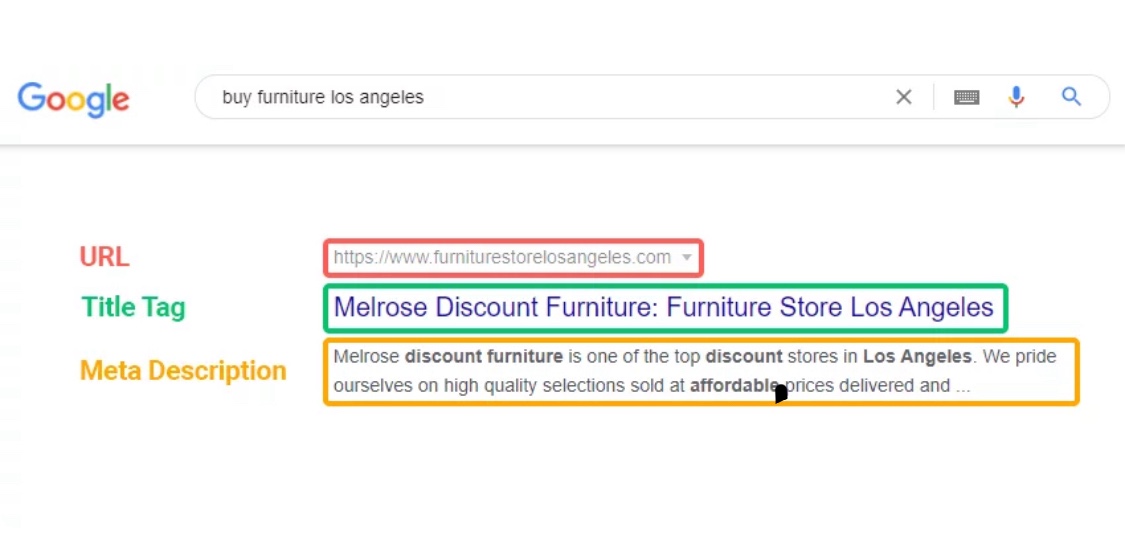
As you start your new business or continue working on an old business you run into a ton of new words and processes that help get your store in front of customers. I know as I go down this journey I am constantly learning new things. I know when I first heard Meta description or meta definitions I was like WHAT ARE YOU TALKING ABOUT. I know there has to be at least 1 person out there feeling the same way. So basically a Meta description is HTML tag that summarizes a webpages content. I will explain about HTML in another post. Normally the meta description shows up under your page title in the search engine results page it should be around 160 characters long . Remember this is not an SEO ranking factor but more of a “Hey look at me don’t you want to click on me.” The page title is the SEO ranking factor but the meta description aids in effective on page SEO.
I know I have seen on social media too many times people shaming a mother or father for being overwhelmed with their children. Why does society make parents feel bad for speaking up and admitting their children irritated their soul today. They say that they are fed up for the day at a emotional breaking point because their boss was an A-hole today, the counter is a mess AGAIN, dinner needs to be made, bills need to be paid, and guess what they have only had 3 hours of sleep. But the minute they admit that here comes all the “Karen’s” … they didn’t ask to be born… no one told you to have kids… I know how it is to grow up without a mothers/fathers love you should be ashamed of yourself.. Not once offering a warm support of understanding, a recommendation of what helps them get through a bad week.. No way that can’t happen because I need the reassurance that I’m a better parent, wife, husband, worker than that person. Now I can walk with my head held high and tell people how awful This person is and thank god I’m not them .. ugh can you believe that Michele gave little Abby leftovers 3 nights in a row that is absolutely disgusting. We’ll miss perfect why don’t you drop off some homemade food off to support your fellow mom .. #dobetter # nooneisperfect #supporteachother
Forming an LLC (Limited Liability Company) is easier than ever — and you don’t need a lawyer to get started. Here’s how to file an LLC from any U.S. state in a few simple steps:
📝 Step 1: Choose Your LLC Name
Your business name must:
Be unique in your state (no duplicates)
Include “LLC,” “L.L.C.,” or “Limited Liability Company”
Not use restricted terms like “Bank,” “Insurance,” or “Attorney” unless you meet extra requirements
📍Tip: Use your state’s business name search tool to check availability before you file.
Step 2: Appoint a Registered Agent
This is the person or service that will receive legal and official mail on your behalf.
Must have a physical address in your state
Can be you, a friend, or a professional service
Must be available during business hours
📂 Step 3: File the Articles of Organization
This is your official registration form. You’ll file it with your Secretary of State (or equivalent department).
What you’ll need:
Business name
Registered agent info
Member/manager info
Business address
Filing fee (usually $50–$200)
💡 You can file online in most states. Paper mail is also an option but slower.
📃 Step 4: Create an Operating Agreement
Even if not required, you should create one — especially if you have partners.
It includes:
Who owns the business
What percentage each member has
How decisions are made
What happens if someone leaves the business
Step 5: Get an EIN (Employer Identification Number)
Even if you’re a single-member LLC, you’ll need an EIN for:
Business taxes
Opening a business bank account
Hiring employees
It’s 100% free through the IRS. Apply here: irs.gov/ein
💻 Step 6: Check for Licenses and Permits
Depending on your business and location, you may need:
A local business license
A seller’s permit or resale certificate
Health, fire, or zoning permits
📞 Contact your city or county clerk’s office to find out what applies to you.
🔁 Step 7: File Annual Reports & Pay Business Taxes
Most states require a yearly report and state-level business taxes to keep your LLC active.
Set reminders
Keep your address updated
Watch out for late fees
🧠 Bonus Tip: Consider an LLC Formation Service
If you want help:
Incfile, Northwest Registered Agent, and Bizee (formerly Incfile) are top-rated.
Most services charge $0–$39 for basic filing (+ your state fee).
This universal LLC roadmap works for any U.S. state and helps you stay legally protected, tax-ready, and set up for success.
📌 Disclaimer
This blog post is for informational purposes only and should not be considered legal, financial, or tax advice. While I strive to provide accurate and up-to-date information, laws and regulations can change, and may vary by state. You are encouraged to consult with a licensed attorney, accountant, or qualified professional before making any business decisions.
Additionally, this post may contain affiliate links. If you click and make a purchase, I may earn a small commission at no extra cost to you. I only recommend products and services I trust and believe will be valuable to my readers.
If you’re ready to make your side hustle official or launch a new brand, forming an LLC in Illinois is a smart, affordable way to protect your business and personal assets. In this post, I’ll walk you through the cheapest way to file your LLC, give you a free operating agreement template, and include a compliance checklist to keep your business legit every year.
💡 Why Choose an LLC in Illinois?
An LLC, or Limited Liability Company, gives you:
Legal protection (your personal assets are separate from your business)
Flexibility in how you’re taxed
Professionalism and credibility (especially when dealing with banks and customers
✅ Step-by-Step: How to File an LLC in Illinois the Cheapest Way
1. Choose Your Business Name
Make sure your name is:
Unique and not already taken
Includes “LLC” or “Limited Liability Company”
🔍 Check name availability at the Illinois business search portal.
Open a separate business bank account (you’ll need your EIN and Articles of Organization)
Use your LLC name consistently across invoices, social media, and tax filings
Consider business insurance if you sell products or services to the public
Final Thoughts
Starting your LLC in Illinois doesn’t have to be expensive or confusing. With a bit of time and the right tools (like the free templates here), you can set up a solid legal foundation for your brand — and keep it going for years to come.
📌 Disclaimer
This blog post is for informational purposes only and should not be considered legal, financial, or tax advice. While I strive to provide accurate and up-to-date information, laws and regulations can change, and may vary by state. You are encouraged to consult with a licensed attorney, accountant, or qualified professional before making any business decisions.
Additionally, this post may contain affiliate links. If you click and make a purchase, I may earn a small commission at no extra cost to you. I only recommend products and services I trust and believe will be valuable to my readers.
In today’s competitive eCommerce world, staying ahead of trends isn’t optional—it’s essential. For Amazon sellers, that means having access to real-time data, actionable insights, and predictive tools that give you a leg up on what’s next in the market. That’s where Amazon’s new “Sell the Trend” dashboard comes into play.
This latest update from Amazon isn’t just a minor tweak—it’s a major move to empower sellers with a deeper understanding of consumer behavior, seasonal trends, and product demand in real time. Whether you’re a seasoned private label brand, dropshipper, or TikTok Shop affiliate driving traffic to Amazon listings, this dashboard opens the door to smarter selling.
In this post, we’ll break down everything you need to know about the new Sell the Trend dashboard: what it is, how it works, who it’s for, and how you can use it to increase visibility, boost conversions, and ride the wave of trending products.
What Is the Sell the Trend Dashboard on Amazon?
The Sell the Trend dashboard is a newly released tool inside Amazon Seller Central designed to help sellers identify trending products, categories, and keywords on Amazon’s marketplace. This dashboard aggregates real-time data and historical performance to spotlight what’s hot and gaining momentum, both in your specific niche and across the platform.
You can think of it as Amazon’s answer to third-party tools like Trendster, Jungle Scout, or Viral Launch—but built directly into your Seller Central interface. And unlike outside tools, this data comes straight from the source: Amazon itself.
Key Features of the Sell the Trend Dashboard
Here’s what you can expect from the new dashboard:
🔍 1. Trending Product Insights
You’ll see which products are trending upward based on:
Sales velocity
Conversion rate
Customer review activity
Page visits over time
Amazon visually tracks this with easy-to-read graphs, so you can quickly spot spikes and predict whether a product has long-term potential or is just having a viral moment.
2. Keyword Surge Analysis
If you’re an SEO-minded seller or affiliate, this is a goldmine. The dashboard highlights which keywords are gaining traction across Amazon searches, especially when paired with rising products. This helps sellers:
Optimize product listings
Run more effective PPC campaigns
Discover long-tail keywords before they become oversaturated
🗂️ 3. Category-Level Trends
You’re no longer limited to searching for individual product trends. The dashboard provides broad category overviews, helping you identify rising niches before they hit the mainstream. This is especially useful for new sellers looking to break into less competitive markets.
🧠 4. AI-Based Forecasting
One of the most powerful elements is Amazon’s integration of predictive analytics. Using machine learning, the dashboard forecasts future demand based on seasonality, shopping trends, and past consumer behavior. Think of it as trend forecasting for Q4, Prime Day, or Back-to-School—all in one place.
5. Buy Box Monitoring
Not just for trend spotting—the dashboard also monitors Buy Box shifts on trending products. This helps you analyze how competition is affecting pricing, fulfillment options, and visibility.
Who Should Use the Sell the Trend Dashboard?
This dashboard was clearly built with multiple types of sellers in mind, including:
Private Label Brands: See which adjacent niches are growing so you can expand product lines or bundle strategically.
Retail Arbitrage Sellers: Discover trending items you can source locally and flip on Amazon.
Dropshippers: Identify hot sellers without committing to inventory upfront.
Affiliate Marketers (e.g., TikTok Shop/Amazon Influencers): Spot viral products early and start creating content before the space becomes saturated.
Content Creators & Bloggers: Get keyword and trend insights to craft timely, high-converting content that links to Amazon.
How to Access the Sell the Trend Dashboard
If you’re an active Amazon seller, here’s how to find and use the dashboard:
1. Log into Seller Central Go to your Amazon Seller Central homepage.
2. Navigate to the Growth Tab Find the “Growth” or “Analytics” section in the top navigation bar.
3. Click on “Sell the Trend” This new feature will appear either as a sidebar option or in the dropdown under performance tools.
4. Filter and Explore Use filters like category, timeframe, and fulfillment method (FBA vs. FBM) to tailor your trend research.
If you don’t see it yet, Amazon may still be rolling it out gradually. Make sure your account is in good standing, and consider requesting access through Seller Support if you’re eager to start using it.
Best Practices for Using the Dashboard
To get the most out of Sell the Trend, here are a few smart strategies:
1. Validate Before You Source
Don’t just go off a trend spike—look at the historical data, forecasted growth, and competition. The dashboard helps you avoid flash-in-the-pan products that won’t have lasting demand.
2. Pair It With TikTok Trends
If you’re promoting Amazon products through short-form content, match Amazon’s trending products with viral TikTok audio or seasonal content ideas. This double-trend approach can increase clicks and conversions.
3. Use It to Plan Your Q4
Use predictive analytics in the dashboard to see which products are forecasted to spike during holidays and peak shopping times. Start sourcing, optimizing, and advertising 2–3 months in advance.
4. Optimize Listings with Keyword Data
Use the trending keywords data to update your product titles, bullet points, and backend search terms. This can dramatically improve your organic visibility.
Pros and Cons of the Dashboard
✅ Pros:
Built directly into Amazon (no 3rd-party login)
Real-time data from the actual platform
Easy-to-read graphs and AI forecasts
Free for Amazon sellers
Works well with affiliate and influencer content planning
❌ Cons:
Still in limited rollout (not available to every seller yet)
Not as advanced in historical trend depth as some premium tools
May require additional tools for in-depth competitive analysis or supplier sourcing
Final Thoughts: A Must-Have Tool for Future-Proof Sellers
The Sell the Trend dashboard isn’t just another feature—it’s Amazon giving sellers a chance to get ahead of the curve using first-party data. In the fast-paced world of eCommerce, minutes can matter. The earlier you identify a trend, the more profitable your strategy becomes—whether that’s launching a new product, adjusting your PPC, or creating viral TikTok content around it.
If you’re serious about growing your Amazon sales—especially heading into major retail periods like Black Friday, Prime Day, or back-to-school—this dashboard is a tool you should be checking weekly (if not daily).
Bonus Tip: How to Pair It With TikTok Content
If you’re an Amazon influencer or affiliate on TikTok:
Search for trending products from the dashboard.
Create 15-second “must-have” or “Amazon finds” videos.
Use Amazon trending keywords in your video caption, SEO hashtags, and voiceover.
Link to your Amazon storefront or affiliate link.
This is where data meets content—and drives real income.
Disclaimer: This blog post is for informational and educational purposes only. It does not guarantee or promise any specific income, results, or business success. Any earnings or financial outcomes mentioned are not typical and are not guaranteed. Your results will vary based on factors such as effort, strategy, market conditions, and individual circumstances. Always do your own research and consult with a professional advisor before making financial or business decisions.
Whether you’re a content creator, affiliate marketer, YouTuber, or TikTok powerhouse, B-roll is your best friend. It’s the secret sauce that transforms boring talking-head videos into visually rich experiences that keep your viewers hooked.But wait—what exactly is B-roll? And more importantly, how do you use it to grow your audience and drive engagement?Let’s break it all down, step by step.
What is B-Roll, Anyway?
B-roll is the supplemental or secondary footage that enhances your main shot (called A-roll). If A-roll is you talking to the camera, B-roll is everything else: the cutaway scenes, reaction shots, zoom-ins, product close-ups, scenic backgrounds, or hands typing on a laptop.Think of it this way:A-roll = The storyB-roll = The visuals that bring it to lifeB-roll isn’t just filler—when done right, it adds depth, emotion, and visual rhythm to your videos.
Why B-Roll is a Game-Changer for Engagement
If you’re serious about content creation, especially for TikTok, Instagram Reels, YouTube Shorts, or long-form YouTube, B-roll does more than just “look pretty.
“Here’s how B-roll boosts your content performance:
Increases Retention: Quick B-roll cuts keep the eye engaged, making viewers less likely to scroll away.Conveys Emotion: A shot of hands shaking, a cup of coffee steaming, or a teardrop falling says more than words ever could.
Improves Understanding: Showing the product or process you’re explaining helps reinforce your message.
Boosts Professionalism: Viewers feel the effort, and that builds credibility and trust.Breaks
Visual Monotony: No one wants to stare at your face for 90 seconds straight (sorry, not sorry).
Common Types of B-Roll and When to Use Them
Different types of B-roll serve different storytelling purposes. Let’s break it down:
Example: A zoom-in on your surprised face while unboxing a product adds authenticity.
4. Process Footage Perfect for: DIYs, cooking, behind-the-scenes, tutorials.
Example: Recording the step-by-step creation of a dish while you narrate in the background.
5. Screen Recordings or Overlays Perfect for: Tech tutorials, app reviews, digital walkthroughs.
Example: Reviewing an affiliate product? Show the buying process or features in action with a screen share.
How to Create High-Quality B-Roll (Even with Your Phone)
Creating B-roll doesn’t have to be expensive or complicated. Here’s a no-fluff guide to DIY B-roll creation—even if all you have is a smartphone.
1. Use Natural Lighting light is everything. Film near a window or outdoors when possible. Avoid harsh overhead lights unless you’re using softbox setups.
2. Shoot in Horizontal and Vertical: If you’re creating for TikTok or Reels, vertical is king. For YouTube, shoot horizontal. But hey, shoot both and repurpose!
3. Capture Movement: Even a slow pan or tilt adds interest. Use your body as a stabilizer or grab a tripod or gimbal for smooth shots.
4. Film in Short Segments:Don’t overthink it—5- to 10-second clips work great. Capture the same shot from multiple angles for variety.
5. Use Grid lines and Focus Lock: Enable your camera’s grid lines for better composition and lock focus on the subject for crisp quality.
Where to Find B-Roll (If You Don’t Want to Shoot It)
No time to film your own B-roll? No sweat. There are tons of royalty-free libraries to grab high-quality clips:
Pexels
Pixabay
Mixkit
Storyblocks (paid)
Artgrid (pro-level quality)
Pro Tip: If you’re using B-roll for monetized or affiliate videos, check the license to make sure it’s cleared for commercial use.
How to Use B-Roll Effectively in Your Videos
Now comes the fun part—editing B-roll into your content for max impact.
1. Support What You’re Saying: B-roll should visually match or amplify what you’re talking about. If you’re discussing a product feature, show it.
2. Add B-Roll Every 5–10 Seconds: This pacing keeps your visuals fresh and your audience engaged. On TikTok, attention spans are microscopic—keep it moving!
3. Layer Text and Effects: Add on-screen text, emojis, or transitions to your B-roll for extra flair.
4. Match B-Roll with Music: Let the rhythm of your background music guide your cuts. Sync transitions to beat drops or lyric changes.
5. Use It as a Hook: Sometimes B-roll is the hook. A dramatic slow-motion pour or eye-catching unboxing can stop thumbs mid-scroll.
Yep, even good things can go wrong. Here are a few common B-roll blunders to dodge:
Using too much of it: B-roll isn’t the main show. If it overtakes your narrative, it gets confusing.
Random footage: Make sure your B-roll has a purpose. Don’t throw in a sunset clip unless it relates to the story.
Clashing quality: Don’t mix HD A-roll with grainy or poorly lit B-roll.
Overusing stock B-roll: Makes your content feel generic. Whenever possible, create custom clips—it’s worth it.
Real-World B-Roll Use Case: Affiliate Video Example
Imagine you’re making a TikTok video promoting a standing desk for affiliate commission.
A-Roll:You’re on camera saying:“Working from home wrecked my back—until I tried this adjustable standing desk.
”B-Roll Inserts:Clip of the desk being assembled (process footage)
Time-lapse of you adjusting the height.
Zoom-in on the control panel and cup holder.
POV of your clean work space.Reaction shot of your satisfied face.
Result: Your viewers understand what the product is, see it in action, and trust your recommendation. Engagement + conversions = win.
B-Roll Editing Tools You Can Use
Don’t let tech slow you down. These tools make inserting B-roll a breeze:
For Phones:
CapCut – Free, TikTok-friendly In Shot – User-friendly, great for overlays
VN Editor – Powerful and intuitive.
For Desktop:
Adobe Premiere Pro – For pros with time
Final Cut Pro – Mac-friendly option
DaVinci Resolve – Great free version with pro features
B-Roll and Your Growth Strategy
Still wondering if B-roll is worth the effort? Here’s how it directly impacts your growth:Better engagement = higher reach: TikTok and Instagram reward videos with high retention.More shares and saves: B-roll makes content more helpful and aesthetic, increasing shareability.Boosted brand image: Clean, visually engaging content builds trust, which is vital for affiliate sales.Repurpose potential: Your B-roll can be reused in carousels, reels, ads, or even blog content.
TL;DR—Quick B-Roll Checklist
Before you post your next video, ask yourself:Did I shoot B-roll that supports my main message?Am I breaking up long talking points with relevant cutaways?Is my B-roll clear, well-lit, and stable?Did I match my visuals to my audio and pacing?If yes, you’re not just a content creator—you’re a storyteller.
FAQs About B-Roll
Q: Can I use the same B-roll in multiple videos?Yes! Just don’t overuse it. Mix in new shots or crop/zoom to make it feel fresh.Q: How long should B-roll clips be?5–10 seconds is a great range. You can trim them during editing.Q: Should I record B-roll before or after A-roll?Either works. Some creators like to plan B-roll after filming their main content to match what they said.Q: Does B-roll help with SEO or ranking?Indirectly—better engagement means more reach. And on YouTube, that definitely helps your video show up in search.
Want to Take Your Videos to the Next Level?
If you’re serious about growing through TikTok, Reels, or YouTube—mastering B-roll is non-negotiable.Don’t overthink it. Start simple. Use your phone. Film what you already do. Layer it in thoughtfully.And remember: The difference between amateur-looking and pro-level content often comes down to how well you use your B-roll.
Disclaimer: The information provided in this article is for educational and informational purposes only. It does not constitute professional advice.
Hook, Line, and Commission: 5 TikTok Hooks That Sell in Seconds (Literally)
The TikTok algorithm is a fast-paced beast. It doesn’t care about your product’s backstory, your hustle, or your amazing discount code—unless you catch your viewer’s attention in the first 3 seconds.
In the affiliate marketing world, that means your content needs to hook, convert, and subtly sell—all at once. So how do you do that without sounding pushy or getting scrolled past?
Let’s break it down. Here are 5 battle-tested hook styles that affiliate marketers are using right now to explode their engagement and rake in commissions—plus examples and which types of videos they work best with.
1. The Shock & Curiosity Hook
“You won’t believe what this $29 gadget can do…”
Why it works:
Our brains are wired for novelty. When something feels out of place or unexpected, we’re more likely to stop and investigate. This hook triggers curiosity without revealing the payoff—making viewers stick around.
“No one told me THIS would happen if I used this skincare serum daily…”
“I almost threw this out until I realized it’s worth $$$.”
Best For:
Product reveals or demos
Budget product reviews
“Hidden gem” affiliate finds
Pro Tip:
Pair this with fast, eye-catching B-roll—like a dramatic before-and-after or a first-use reaction. Use bold on-screen text with a pause to add tension.
2. The Problem-Solution Hook
“Struggling to stay productive? This $12 hack fixed my focus.”
Why it works:
This hook taps into pain points—then offers an immediate solution. It’s classic copywriting psychology and works especially well in niches like productivity, wellness, tech, and beauty.
Examples:
“Tired of flaky skin no matter what you use? This fixed mine.”
“I couldn’t stay organized—until I found this $15 planner.”
“My back pain was killing me. This $30 thing changed everything.”
Best For:
Niche-specific pain points (health, time management, clutter)
Tutorials or product walkthroughs
Personal transformation stories
Pro Tip:
Use the viewer’s internal voice. Start your hook with their problem, not your story. Then hint at the product as the miracle fix—without giving too much away upfront.
3. The “Wait for It” Tease Hook
“Don’t skip—this gets WILD at the end.”
Why it works:
TikTok loves watch time. When you tease a payoff (“Watch what happens at 0:13!”), viewers hang around longer. That boosts retention, which boosts reach, which—yep—boosts clicks.
Examples:
“The way this skincare serum worked in 30 minutes… insane.”
“Wait ‘til you see the final look—this mascara is nuts.”
“Just wait—this little gadget did something crazy to my phone.”
Use jump cuts and cliffhangers. Start with the “before,” add suspenseful music or text, then pay it off big time.
4. The Controversial or Bold Opinion Hook
“Stop wasting money on [popular product]. This is better AND cheaper.”
Why it works:
Conflict and controversy stop the scroll. This type of hook challenges common beliefs or brands, drawing curiosity and engagement (plus comments). It positions your affiliate product as the underdog hero.
Examples:
“Don’t buy the Dyson—this $39 dupe works just as well.”
“Everyone says XYZ is the best. Nope. Try this instead.”
“Amazon lied. THIS is the best home tool I’ve used.”
Best For:
Side-by-side comparisons
“Dupe” videos
Budget-friendly alternatives to big-ticket items
Pro Tip:
Be honest but fair. Back up your claim with results. Use split-screen edits to show comparisons side-by-side. That sells
5. The “Insider Secret” Hook
“Most people don’t know Amazon hides deals like this…”
Why it works:
People LOVE feeling like they’re in on a secret. It builds trust and curiosity instantly. These hooks suggest exclusivity and value—without sounding salesy.
Examples:
“Here’s a discount most people don’t know exists on Amazon.”
“Insider hack: How I saved 40% with this plugin.”
“Most people miss this freebie when buying online…”
Best For:
Affiliate deals, coupons, or cashback offers
Browser extensions and software tools
List-style TikToks (“3 hidden tools to save money online”)
Pro Tip:
Pair it with screen recordings or walkthroughs to make it feel like a discovery. End with a CTA like “Try this before it disappears.”
How to Choose the Right Hook for Your TikTok Affiliate Video
Even the best hook line needs visual backup. Here’s how to make sure your TikTok intro slaps:
Use large, bold on-screen text with high contrast. Make it readable instantly.
Start with a quick close-up or interesting visual frame.
Use suspenseful sound bites or trending audios that match your hook vibe.
Cut fluff. No “Hey guys” or “So today I wanna…”—jump straight in.
Add captions for silent scrollers (you’ll thank me later).
Call-To-Action That Doesn’t Scream “Salesy”
Affiliate success isn’t just about clicks—it’s about trust. Here’s how to close strong:
“Link’s in bio if you wanna try it.”
“I saved 40% using this—grab it while it lasts.”
“Code ‘XYZ’ at checkout if you’re gonna try it too.”
“I honestly didn’t expect this to work—let me know if you try it.”
Make it personal. No pressure. Just value.
Wrapping It Up (But Make It Actionable)
There you have it—5 attention-grabbing, scroll-stopping TikTok hooks tailored specifically for affiliate marketing videos. These aren’t just random lines; they’re built on viewer psychology, algorithm love, and real-deal conversion potential.
To quickly recap:
Curiosity gets clicks.
Solutions build trust.
Teases boost watch time.
Opinions stir engagement.
Secrets trigger action.
Start testing these today in your next few TikToks. Track your watch time, click-through rate, and affiliate conversions. You’ll be shocked at what a strong hook can do.
Facts and Questions
Q: Can I use more than one hook in a TikTok? Absolutely! You can layer them. For example, start with curiosity and end with a teaser or secret.
Q: How long should a TikTok hook be? The first 1–3 seconds are key. Ideally, 1 quick sentence or visual punch.
Q: Do I need to speak or can I use just text? Both work! Text hooks with strong visuals perform great. But if your delivery is authentic, voice can be powerful.
Q: How often should I test new hooks? Try switching hooks every 2-3 videos. Analyze what’s driving retention and tweak from there.
Want More TikTok Affiliate Marketing Tips?
Check out these helpful resources:
Neil Patel on High-Converting Short-Form Copy
HubSpot: TikTok Marketing for Beginners
AnswerThePublic: Discover Questions Your Audience is Asking
Disclaimer: The information provided in this article is for educational and informational purposes only. It does not constitute professional advice.
Balancing a full-time job while pursuing a passion for content creation is a challenge many face. The desire to transition from a 9-to-5 job to a full-time content creator requires strategic planning, discipline, and effective time management. This guide provides actionable tips to help you manage your time efficiently, ensuring progress in your content creation journey without compromising your primary job responsibilities.
1. Set Clear Goals and Prioritize Tasks
Begin by defining what you aim to achieve with your content creation. Whether it’s building a personal brand, generating additional income, or transitioning to full-time content creation, having clear goals will guide your actions.
Action Steps:
Define SMART Goals: Ensure your goals are Specific, Measurable, Achievable, Relevant, and Time-bound.
Prioritize Tasks: Use the Eisenhower Matrix to categorize tasks based on urgency and importance, helping you focus on what truly matters.
2. Develop a Structured Schedule
Creating a structured schedule is crucial for balancing work and content creation. Allocate specific time blocks for content-related activities, ensuring consistency and productivity.
Action Steps:
Time Blocking: Dedicate fixed time slots each day or week exclusively for content creation tasks.
Utilize Calendars: Use digital calendars or planning tools to organize your schedule and set reminders for content deadlines.
3. Leverage Early Mornings and Evenings
Maximize your productivity by utilizing early mornings or evenings for content creation. These periods are often free from work-related obligations and can be ideal for focused work.
Action Steps:
Morning Routine: Wake up an hour earlier to work on content before your day job begins.
Evening Sessions: Allocate time after work for tasks like editing, planning, or engaging with your audience.
4. Embrace Content Batching
Content batching involves creating multiple pieces of content in one session, enhancing efficiency and consistency.
Action Steps:
Plan Ahead: Outline content topics and create scripts or outlines in advance.
Batch Tasks: Dedicate specific days to tasks like filming, editing, or writing to streamline your workflow.
5. Utilize Productivity Techniques
Incorporate productivity techniques to maintain focus and prevent burnout.
Action Steps:
Pomodoro Technique: Work in focused intervals (e.g., 25 minutes) followed by short breaks to maintain concentration.
52/17 Rule: Work for 52 minutes and take a 17-minute break to recharge, enhancing overall productivity.
6. Automate and Delegate Tasks
Automation and delegation can save time and reduce workload, allowing you to focus on creative aspects.
Action Steps:
Automation Tools: Use tools like Buffer or Hootsuite to schedule social media posts in advance.
Outsource: Consider hiring freelancers for tasks like editing or graphic design when feasible.
7. Create a Dedicated Workspace
Having a designated workspace can enhance focus and signal your brain that it’s time for content creation.
Action Steps:
Set Up a Home Office: Even a small, organized space can serve as an effective content creation zone.
Minimize Distractions: Keep your workspace free from non-essential items to maintain concentration.
8. Monitor Progress and Adjust Accordingly
Regularly assess your progress to identify what’s working and what needs improvement.
Action Steps:
Track Metrics: Monitor engagement, growth, and other relevant metrics to gauge success.
Reflect and Adjust: Periodically review your strategies and make necessary adjustments to optimize results.
9. Maintain Work-Life Balance
Balancing content creation with a full-time job requires attention to personal well-being to prevent burnout.
Action Steps:
Set Boundaries: Define clear boundaries between work, content creation, and personal time.
Self-Care: Incorporate activities that promote relaxation and mental health into your routine
10. Stay Consistent and Patient
Consistency is key to growth in content creation. Understand that building an audience and achieving goals takes time.
Action Steps:
Stick to Your Schedule: Even when progress seems slow, maintaining your routine is crucial.
Celebrate Milestones: Acknowledge and celebrate small achievements to stay motivated.
Conclusion
Balancing a 9-to-5 job with content creation is undoubtedly challenging but entirely achievable with effective time management and dedication. By setting clear goals, structuring your schedule, leveraging productivity techniques, and maintaining a healthy work-life balance, you can steadily progress toward becoming a successful content creator.
In 2025, the creator economy has evolved into a dynamic landscape offering diverse revenue streams for content creators. Whether you’re a budding influencer, a passionate blogger, or a niche podcaster, understanding and leveraging these monetization strategies is crucial for building a sustainable content creation business.
1. Affiliate Marketing: Turning Recommendations into Revenue
Affiliate marketing remains a cornerstone for content creators aiming to monetize their platforms. By promoting products or services and earning a commission for each sale made through your unique affiliate link, you can generate passive income.
Key Platforms:
Amazon Associates: Ideal for a wide range of products.
ShareASale: Offers a vast network of merchants across various niches.
CJ Affiliate: Provides access to numerous well-known brands.
Tips for Success:
Authenticity: Promote products you genuinely use and believe in.
Transparency: Always disclose affiliate relationships to maintain trust with your audience.
Content Integration: Incorporate affiliate links naturally within your content, such as in product reviews or tutorials.
2. Brand Partnerships: Collaborate and Grow
Collaborating with brands can be a lucrative avenue, especially as companies increasingly seek authentic voices to promote their products.
Types of Partnerships:
Sponsored Content: Creating content that features a brand’s product or service.
Product Placements: Subtly integrating a product into your content.
Long-term Ambassadorships: Ongoing relationships where you represent a brand over time.
Strategies:
Build a Media Kit: Showcase your audience demographics, engagement rates, and past collaborations.
Network: Attend industry events and engage with brands on social media platforms.
Negotiate Fairly: Understand your worth and ensure agreements are mutually beneficial.
3. Merchandise Sales: Capitalize on Your Brand
Selling merchandise allows you to monetize your brand while providing value to your audience.
Popular Merchandise Options:
Apparel: T-shirts, hoodies, and hats featuring your logo or catchphrases.
Accessories: Stickers, mugs, and phone cases.
Digital Products: E-books, presets, or exclusive content.
Platforms to Consider:
Teespring: Offers print-on-demand services with no upfront costs.
Shopify: Provides a customizable storefront for selling various products.
Etsy: Ideal for handmade or unique items.
Tips:
Quality Matters: Ensure your products are of high quality to maintain brand reputation.
Engage Your Audience: Involve your followers in the design process through polls or contests.
4. Subscription Models: Offer Exclusive Content
Subscription-based models provide a steady income stream while fostering a closer connection with your audience.
Platforms:
Patreon: Allows creators to offer tiered memberships with varying perks.
Substack: Ideal for writers and newsletter creators.
YouTube Memberships: Enables fans to support your channel directly.
Benefits:
Predictable Income: Regular payments help in financial planning.
Community Building: Exclusive content fosters a sense of belonging among subscribers.
Creative Freedom: Less reliance on algorithms allows for more authentic content.
5. Online Courses and Workshops: Share Your Expertise
If you possess specialized knowledge or skills, consider creating online courses or hosting workshops.
Platforms:
Udemy: Offers a vast marketplace for various courses.
Teachable: Provides tools to create and sell online courses.
Skillshare: Focuses on creative and entrepreneurial skills.
Tips:
Identify Your Niche: Focus on topics you’re passionate about and knowledgeable in.
Engage Learners: Incorporate interactive elements like quizzes and assignments.
Promote Effectively: Utilize your existing platforms to market your courses.
6. Crowdfunding: Rally Support for Your Projects
Crowdfunding can be an effective way to finance specific projects or ventures.
Popular Platforms:
Kickstarter: Ideal for creative projects with tangible outcomes.
Indiegogo: Offers flexible funding options for various initiatives.
GoFundMe: Suitable for personal causes and community-driven projects.
Strategies:
Set Clear Goals: Define what the funds will be used for.
Offer Incentives: Provide backers with rewards or exclusive content.
Promote Widely: Leverage all your platforms to reach potential supporters.
7. Ad Revenue: Monetize Your Content Directly
Platforms like YouTube and blogs allow creators to earn through ad placements.
Considerations:
Understand the Algorithms: Stay updated on platform changes that may affect ad revenue.
Diversify Content: Create a mix of evergreen and trending content to maximize views.
Engage Your Audience: Higher engagement can lead to better ad placements and rates.
8. Live Streaming: Real-Time Engagement and Earnings
Live streaming offers immediate interaction with your audience and opportunities for monetization.
Platforms:
Twitch: Popular among gamers and creative professionals.
YouTube Live: Accessible to a broad audience base.
Instagram Live: Ideal for casual interactions and Q&A sessions.
Monetization Methods:
Donations: Viewers can contribute directly during streams.
Sponsorships: Brands may sponsor live sessions for product promotions.
Merchandise Sales: Promote and sell products during live events.
9. Licensing Your Content: Expand Your Reach
Licensing allows other entities to use your content, providing additional revenue streams.
Opportunities:
Stock Libraries: Sell photos, videos, or music to platforms like Shutterstock or Getty Images.
Media Outlets: License articles or videos to news organizations or blogs.
Educational Institutions: Provide content for academic purposes.
Tips:
Protect Your Work: Ensure proper contracts are in place to safeguard your rights.
Track Usage: Monitor where and how your content is being used.
10. Consulting and Coaching: Leverage Your Experience
As you gain expertise, offering consulting or coaching services can be a profitable venture.
Services to Offer:
One-on-One Coaching: Personalized guidance for aspiring creators.
Group Workshops: Interactive sessions covering specific topics.
Business Consulting: Advise brands on influencer marketing strategies.
Promotion Strategies:
Testimonials: Share success stories from past clients.
Content Marketing: Publish articles or videos showcasing your expertise.
Networking: Attend industry events to connect with potential clients.
Conclusion
The digital landscape in 2025 offers content creators an array of monetization strategies to build sustainable and diversified income streams. By leveraging affiliate marketing, brand partnerships, merchandise sales, subscription models, and more, creators can transform their passions into profitable ventures. The key lies in understanding your audience, delivering consistent value, and continuously adapting to the evolving digital ecosystem.
If you’re looking for a great program with a whole community behind you Join Creator Evolution Today !
Disclaimer: The information provided in this article is for educational and informational purposes only. It does not
Introduction: Embarking on Your Content Creation Journey
In 2025, the content creation landscape is more dynamic than ever. With the rise of AI tools and platforms, new creators have unprecedented opportunities to produce high-quality content. However, navigating the plethora of available tools can be overwhelming. This guide aims to simplify that process by highlighting ten indispensable tools that can streamline your workflow, enhance your content, and set you on the path to success.
1. ChatGPT: Your AI-Powered Writing Assistant
Overview:
ChatGPT is an AI-driven tool that assists in generating ideas, drafting content, and refining your writing.
Features:
Idea generation for blogs, scripts, and social media posts.
Grammar and style suggestions.
Customizable tone and voice settings.
Why It’s Essential: For new creators, overcoming writer’s block and maintaining consistent content quality can be challenging. ChatGPT serves as a reliable assistant, ensuring your content remains engaging and polished.
2. Canva: Simplified Graphic Design
Overview:
Canva is a user-friendly design platform that allows creators to produce visually appealing graphics without prior design experience.
Features:
Drag-and-drop interface with customizable templates.
Extensive library of images, icons, and fonts.
Collaboration features for team projects.
Why It’s Essential: Visual content is crucial for engagement. Canva empowers creators to design professional-looking graphics for social media, blogs, and more, enhancing brand consistency and appeal.
3. CapCut: Mobile Video Editing Made Easy
Overview:
CapCut is a mobile video editing app that offers a range of features suitable for both beginners and experienced editors.
Features:
Intuitive timeline editing with transitions and effects.
Built-in music library and sound effects.
Support for high-resolution exports.
Why It’s Essential: Video content dominates online platforms. CapCut provides an accessible solution for editing videos on-the-go, ensuring your content remains dynamic and engaging.
4. Notion: Organize Your Creative Process
Overview:
Notion is an all-in-one workspace that combines note-taking, task management, and database functionalities.
Features:
Customizable templates for content calendars and project tracking.
Integration with other tools like Google Drive and Trello.
Collaboration features for team-based projects.
Why It’s Essential: Staying organized is key to consistent content creation. Notion helps streamline your workflow, ensuring you meet deadlines and maintain content quality
5. Grammarly: Enhance Your Writing Quality
Overview:
Grammarly is a writing assistant that checks for grammatical errors, style inconsistencies, and tone.
Features:
Real-time grammar and spell-checking.
Suggestions for clarity and conciseness.
Tone detection to match your intended audience.
Why It’s Essential: Clear and error-free writing builds credibility. Grammarly ensures your written content is polished and professional.
6. Buffer: Streamline Your Social Media Scheduling
Overview:
Buffer is a social media management tool that allows you to schedule posts, track engagement, and analyze performance across multiple platforms.
Features:
Post scheduling for platforms like Instagram, Twitter, and Facebook.
Analytics dashboard to monitor engagement metrics.
Team collaboration features for coordinated campaigns.
Why It’s Essential: Consistency is key in building an online presence. Buffer helps maintain a regular posting schedule, ensuring your audience remains engaged
7. Audacity: Free Audio Editing Software
Overview:
Audacity is an open-source audio editing tool suitable for recording and editing podcasts, voiceovers, and music.
Features:
Multi-track editing with a range of effects.
Noise reduction and equalization tools.
Support for various audio file formats.
Why It’s Essential: High-quality audio enhances the professionalism of your content. Audacity provides robust editing capabilities without the cost.
8. Trello: Visual Project Management
Overview:
Trello is a visual project management tool that uses boards, lists, and cards to organize tasks and projects.
Features:
Drag-and-drop interface for task organization.
Integration with tools like Slack and Google Drive.
Customizable workflows to match your process.
Why It’s Essential: Managing multiple content projects can be complex. Trello offers a clear visual overview, helping you stay on top of your tasks
9. Unsplash: Access to High-Quality Free Images
Overview:
Unsplash provides a vast library of high-resolution images that are free to use for personal and commercial projects.
Features:
Diverse collection of images across various categories.
Easy search functionality.
No attribution required, though appreciated.
Why It’s Essential: Visuals enhance content appeal. Unsplash offers a cost-effective solution for sourcing high-quality images to complement your content
10. TubeBuddy: Optimize Your YouTube Channel
Overview:
TubeBuddy is a browser extension that provides tools to optimize and manage your YouTube content.
Features:
Keyword research and SEO optimization.
A/B testing for thumbnails and titles.
Bulk processing tools for video management.
Why It’s Essential: Growing a YouTube channel requires more than just uploading videos. TubeBuddy offers insights and tools to enhance your channel’s performance and reach.
Conclusion: Equip Yourself for Success
Embarking on a content creation journey in 2025 is both exciting and challenging. By leveraging these ten tools, new creators can streamline their workflows, enhance content quality, and build a strong online presence. Remember, the key to success lies in consistency, continuous learning, and utilizing the right tools to bring your creative visions to life.
Facts and Questions
Q1: Are these tools suitable for all types of content creators?
A: Yes, these tools cater to various content formats, including blogs, videos, podcasts, and social media posts.
Q2: Do I need to invest in all these tools immediately?
A: Not necessarily. Start with the tools that align with your current content needs and expand as your requirements grow.
Q3: Are there free versions available for these tools?
A: Many of these tools offer free versions or trials, allowing you to explore their features before committing to a paid plan.
Q4: How do I choose the right tools for my content strategy?
A: Assess your content goals, preferred formats, and workflow preferences. Select tools that complement your objectives and enhance efficiency.
Introduction: Why Personal Branding Matters in 2025
In today’s digital landscape, personal branding has evolved from a buzzword to a critical component of a content creator’s success. With the creator economy projected to reach $500 billion, standing out requires more than just quality content—it demands a strategic and authentic personal brand. Your personal brand is your digital handshake, your unique story, and your value proposition to the world.
1. Define Your Unique Value Proposition (UVP)Your UVP is the cornerstone of your personal brand. It’s what sets you apart in a saturated market.
To define your UVP: Identify Your Strengths: What skills or knowledge do you possess that others don’t?
Understand Your Audience: Who are they? What problems do they face? How can you help?
Articulate Your Mission: Craft a clear statement that encapsulates your purpose and the value you offer. For example, if you’re a fitness coach specializing in postpartum recovery, your UVP could be: “Empowering new mothers to regain strength and confidence through tailored fitness programs.”
Craft a Consistent Brand Identity
Consistency breeds trust. Your brand identity should be uniform across all platforms. This includes:
Visual Elements: Logos, color schemes, typography, and imagery.
Tone and Voice: Are you formal, casual, humorous, or inspirational?
Messaging: Ensure your core message aligns with your UVP and resonates with your audience.
Tools like Canva or Adobe Express can help maintain visual consistency, while a content style guide can ensure uniformity in tone and messaging.
Develop a Strategic Content Plan
Content is the vehicle through which your personal brand travels.
A strategic content plan should:
Align with Your UVP: Every piece of content should reinforce your unique value.
Address Audience Needs: Create content that solves problems, answers questions, or entertains.
Utilize Various Formats: Blogs, videos, podcasts, infographics, and social media posts.
Maintain a Content Calendar: Plan and schedule content to ensure consistency and relevance.
Remember, quality trumps quantity. It’s better to produce fewer, high-impact pieces than to churn out content that doesn’t add value.
4. Engage and Build Your Community
Engagement transforms passive followers into active community members. To foster engagement:
Respond to Comments and Messages: Show appreciation and build relationships.
Encourage User-Generated Content: Create challenges or prompts that invite audience participation.
Host Live Sessions: Q&As, webinars, or live tutorials can deepen connections.
Create Exclusive Communities: Platforms like Discord or private Facebook groups can offer dedicated spaces for your audience.
Building a community not only strengthens your brand but also provides valuable feedback and ideas for future content.
5. Leverage Collaborations and Partnerships
Collaborations can exponentially increase your reach and credibility.
Consider: Partnering with Complementary Creators: Joint projects can introduce you to new audiences.
Guest Appearances: Appear on podcasts, webinars, or write guest blog posts.
Brand Partnerships: Align with brands that share your values for sponsored content or affiliate marketing. Ensure that any collaboration aligns with your personal brand and offers value to your audience.
6. Monitor and Evolve Your Brand
Personal branding is not a set-it-and-forget-it endeavor. Regularly assess and refine your brand by:
Analyzing Metrics: Track engagement, reach, and conversion rates to understand what’s working.
Soliciting Feedback: Ask your audience for their thoughts and suggestions.
Staying Updated: Keep abreast of industry trends and adapt accordingly.
Flexibility and responsiveness are key to maintaining a relevant and impactful personal brand.
Conclusion: Your Brand, Your Legacy
Building a personal brand as a content creator is a journey of self-discovery, strategic planning, and continuous engagement. It’s about authentically sharing your story, providing value, and connecting with your audience on a deeper level. By defining your UVP, maintaining consistency, creating strategic content, engaging your community, leveraging collaborations, and evolving with feedback, you can establish a personal brand that not only stands out but also leaves a lasting impact
Facts and Questions
Q1: How long does it take to build a personal brand?
A: Building a personal brand is an ongoing process. While initial foundations can be set in a few months, establishing authority and a loyal community can take years of consistent effort.
Q2: Do I need to be on every social media platform?
A: No. Focus on platforms where your target audience is most active and where you can consistently provide value.
Q3: How do I handle negative feedback?
A: Approach negative feedback constructively. Address valid concerns, learn from criticism, and maintain professionalism.
Q4: Can I rebrand if my interests change?
A: Absolutely. Personal brands can evolve. Communicate changes transparently to your audience and ensure the new direction aligns with their interests.
Q5: Should I invest in professional branding services?
A: If budget allows, professional services can provide valuable insights and polish. However, many successful personal brands are built organically with authenticity and consistency.
Join Now
Disclaimer
The Creator Evolution Program is an independent platform and is not affiliated with any specific brand unless explicitly stated. Participation in the program does not guarantee financial success or influencer status. Results may vary depending on individual effort, niche, and market conditions. It is advised to do your own research and consult professionals where necessary before making financial or career-related decisions. This is for informational purpose only and is not a guarantee of becoming financially stable from creating content.
In today’s digital age, content creation has become a powerful avenue for self-expression, entrepreneurship, and community building. Whether you’re passionate about cooking, fitness, fashion, or technology, the Creator Evolution Program offers a comprehensive platform to transform your creative ideas into impactful content. By investing in this program, you’re not just enhancing your skills—you’re investing in your future.
What is the Creator Evolution Program?
The Creator Evolution Program is a dynamic initiative designed to support aspiring and emerging content creators.
It provides a wealth of resources, including:
Educational Content:
Access to blogs, tutorials, and guides covering various aspects of content creation.
Equipment Recommendations:
Curated lists of top-rated cameras, microphones, lighting, and other essential gear.
Software Tools:
Insights into the latest software for video editing, graphic design, and content planning.
Affiliate Opportunities:
Partnerships with platforms like Amazon, Adobe, and Fiverr to monetize your content.
Community Engagement:
A supportive network of fellow creators to share experiences, feedback, and collaborations.
Why Should You Join?
Comprehensive Learning Resources
The program offers a rich library of educational materials tailored to various content niches. Whether you’re starting a podcast, launching a YouTube channel, or building a social media presence, you’ll find step-by-step guides to navigate each platform effectively.
Expert Equipment Guidance
Choosing the right equipment can be overwhelming. The Creator Evolution Program simplifies this by providing curated lists of top-performing gear, ensuring you invest wisely in tools that enhance your content quality.
Monetization Pathways
Through affiliate partnerships and insights into platforms like Fiverr and Artlist, the program opens doors to monetize your content. Learn how to generate income through brand collaborations, sponsored content, and product promotions.
Supportive Community
Join a vibrant community of like-minded creators who share your passion and drive. Engage in discussions, seek feedback, and find collaboration opportunities that can elevate your content and expand your reach.
Continuous Inspiration
Stay motivated with success stories, creative challenges, and regular updates on industry trends. The program ensures you’re always inspired to create and innovate.
Investment and Returns: Maximizing Your ROI
Program Pricing
The Creator Evolution Program offers a tiered pricing structure to accommodate various needs:
Basic Plan: Free access to limited resources and community forums.
Pro Plan: $29.99/month, including advanced tutorials, exclusive webinars, and priority support.
Elite Plan: $59.99/month, offering personalized mentorship, early access to new features, and premium brand partnership opportunities.
Return on Investment
Investing in the Creator Evolution Program can yield significant returns:
Free Samples:
Receive complimentary products from partner brands to review and feature in your content. Brand Collaborations: Access exclusive opportunities to collaborate with brands, enhancing your portfolio and income potential. Affiliate Earnings: Earn commissions by promoting products and services aligned with your niche. Skill Enhancement: Develop valuable skills that can lead to freelance opportunities, consulting gigs, and increased marketability.
Brand Collaborations:
Access exclusive opportunities to collaborate with brands, enhancing your portfolio and income potential. Affiliate Earnings: Earn commissions by promoting products and services aligned with your niche.
Skill Enhancement:
Develop valuable skills that can lead to freelance opportunities, consulting gigs, and increased marketability. By leveraging these benefits, creators can recoup their investment and build sustainable income streams.
Transform Your Passion into a Profession
The Creator Evolution Program is more than just a learning platform; it’s a launchpad for your creative career. By providing the tools, knowledge, and community support, it empowers you to turn your passion into a sustainable profession. Whether you’re aiming to become a full-time content creator or seeking to enhance your personal brand, this program offers the roadmap to success.
Conclusion: Your Creative Journey Starts Here
Investing in yourself is the most valuable decision you can make. The Creator Evolution Program stands as a testament to the power of self-investment, offering a structured path to harness your creativity and achieve your goals. Don’t let hesitation hold you back. Embrace the opportunity to grow, learn, and thrive in the world of content creation.
Join Today
Join today to get TikTok Affiliate Tips sent to your Email
The Creator Evolution Program is an independent platform and is not affiliated with any specific brand unless explicitly stated. Participation in the program does not guarantee financial success or influencer status. Results may vary depending on individual effort, niche, and market conditions. It is advised to do your own research and consult professionals where necessary before making financial or career-related decisions.*