• To create a Limited Liability Company (LLC), you typically need to follow these steps:

    1. Choose a business name: Select a unique name for your LLC that complies with the naming requirements of your jurisdiction.
    2. File Articles of Organization: Prepare and file the necessary legal documents, usually called “Articles of Organization” or a similar name, with the appropriate state or local government agency. This document provides basic information about your LLC, such as its name, address, purpose, and management structure.
    3. Appoint a Registered Agent: Designate a person or company to act as the LLC’s registered agent. The registered agent is responsible for receiving legal and official documents on behalf of the company.
    4. Create an Operating Agreement: While not always legally required, it is advisable to create an operating agreement that outlines the internal rules, ownership structure, and operating procedures of your LLC. This agreement is typically drafted by the LLC members.
    5. Obtain Required Permits and Licenses: Depending on the nature of your business and location, you may need to obtain specific permits or licenses to operate legally. Research and comply with all relevant regulations and requirements.
    6. Obtain an Employer Identification Number (EIN): If your LLC has employees or you plan to open a business bank account, you will need to obtain an EIN from the Internal Revenue Service (IRS). This unique identification number is used for tax purposes.
    7. Comply with Ongoing Requirements: After forming your LLC, you may need to fulfill certain ongoing requirements, such as filing annual reports, paying taxes, and maintaining proper records. Be aware of your jurisdiction’s rules and stay in compliance with all legal obligations.

    DISCLAIMER: It’s important to note that the specific steps and requirements for creating an LLC can vary depending on the jurisdiction, so it’s advisable to consult with a legal professional or business advisor familiar with the laws of your specific location.
  • The types of companies or enterprises that are included in the register can vary depending on the jurisdiction and the specific requirements of that country or region. However, in general, the register may include the following types of companies or enterprises:

    1. Public Limited Company (PLC): A company whose shares are traded on a stock exchange and can be owned by the public.
    2. Private Limited Company (Ltd): A company with limited liability, but whose shares are not publicly traded.
    3. Limited Liability Partnership (LLP): A partnership in which the partners have limited liability for the company’s debts and obligations.
    4. Partnership: A business owned and operated by two or more individuals who share the profits and liabilities.
    5. Sole Proprietorship: A business owned and operated by one person.
    6. Nonprofit Organization: An organization formed for purposes other than generating profit, such as charitable, educational, or religious activities.
    7. Cooperative: A business owned and operated by a group of individuals who share the profits and decision-making.
    8. Franchise: A business model in which an individual or group purchases the rights to operate a business under an established brand and system.

    These are some of the common types of companies or enterprises that may be included in the register, but the specific categories can vary based on the legal framework of the jurisdiction.

    1. Sole proprietorship: A business owned and operated by one person.
    2. Partnership: A business owned and operated by two or more individuals who share the profits and liabilities.
    3. Limited Liability Company (LLC): A business structure that combines the pass-through taxation of a partnership or sole proprietorship with the limited liability protection of a corporation.
    4. Corporation: A legal entity separate from its owners, offering limited liability protection to its shareholders.
    5. Nonprofit organization: An organization formed for purposes other than generating profit, such as charitable, educational, or religious activities.
    6. Cooperative: A business owned and operated by a group of individuals who share the profits and decision-making.
    7. Franchise: A business model in which an individual or group purchases the rights to operate a business under an established brand and system.
    8. Limited Partnership (LP): A partnership that includes both general partners (responsible for business operations) and limited partners (providing capital but having limited liability).
    9. Professional Corporation (PC): A corporation formed by professionals like doctors, lawyers, or accountants to provide services within their respective fields.

    These are just a few examples, and there may be other types of businesses depending on the jurisdiction and industry.

  • Here are a few things I would have done different. First of all don’t pick a long name for you business or business email. Because you will have to type that information about a million times. But if you do pick a long business name abbreviate it in your business email. I know it sounds like useless advice but believe me it is so irritating when you type it twenty times in one day lol.

    Also, follow the right steps to get your business legit . I unfortunately followed the steps in reverse lol. So, then I had to make sure I linked the accounts to my business account and it was a lot of back tracking.

    I know when I first started my trip down business owner road I was clueless. It sounds funny to me even now because I don’t think of myself as a “business owner “ because I feel like we have been conditioned to think of business owners as people who have a huge revenue and huge businesses . So, I am here to tell you if you have a registered business, brick and mortar store, online store, or just selling on Facebook marketplace right now make sure you put that under your profile (or anywhere and anywhere you can think of) BUSINESS OWNER because that’s exactly what you are!!! Keep pushing because one day you will be at the top of the revenue ladder!

  • In the metafields section of Shopify product pages, you have the option to pin or unpin sections. These sections allow you to organize and display custom information in a structured manner. Let’s explore what pinned and unpinned sections are and provide examples of each.

    Pinned Sections:

    Pinned sections are fixed sections that appear at the top of the product page, providing important information that you want to highlight. These sections are typically used to display vital details or features that customers should know before making a purchase. Pinned sections remain visible even when the user scrolls down the page, ensuring that the information is readily accessible.

    For example, if you sell electronic devices, you may want to pin a “Product Specifications” section at the top of the product page. This section can include details such as screen size, processor type, storage capacity, and other technical specifications that customers often look for. By pinning this section, you ensure that these essential details are prominently displayed, and making it easier for your customers to evaluate your product.

  • Pinned section on products page – metafields

    When working with metafields on Shopify product pages

    In the metafields section of Shopify product pages, you have the option to pin or unpin sections. These sections allow you to organize and display custom information in a structured manner. Let’s explore what pinned and sections are and provide examples of each.

    Pinned Sections:

    Pinned sections are fixed sections that appear at the top of the product page, providing important information that you want to highlight. These sections are typically used to display vital details or features that customers should know before making a purchase. Pinned sections remain visible even when the user scrolls down the page, ensuring that the information is readily accessible.

    For example, if you sell electronic devices, you may want to pin a “Product Specifications” section at the top of the product page. This section can include details such as screen size, processor type, storage capacity, and other technical specifications that customers often look for. By pinning this section, you ensure that these essential details are prominently displayed, making it easier for customers to evaluate the product.

  • The HTML stands for Hyper-text markup language and is the markup language for documents designed to be displayed in a web browser. It defines the meaning and structure of web content. The HTML is usually assisted by scripting language technologies like JavaScript .

  • A study by Cyrus Shepard shows Google rewrites 61% of title tags. On average 10-90% of the visitors to your store first encounter it in the search, depending on your organic presence . This gives you a huge opportunity to make that first impression amazing. To maximize your organic traffic you meta descriptions (of course title tags) have to be great. especially because they can significantly impact user behavior, it’s important to put some effort into writing them.

  • One thing I realized is that when you are building your business there are a ton of applications that they say will help you build, grow, and run your business. They can add up and get pricy . You may have a free trial that ends and you forget to cancel so you end up paying for something you don’t use. I am including a free printable PDF to track your subscriptions https://www.canva.com/design/DAF1OVBzVbE/x8iBzJJuSikct7rfF0101Q/view?utm_content=DAF1OVBzVbE&utm_campaign=designshare&utm_medium=link&utm_source=publishsharelink&mode=preview

  • You want to write really good meta descriptions for your highest volume keywords . Focusing mostly on your bestsellers and category page meta descriptions instead of every single item you sell.

    The major reason for this is that unfortunately Google rewrites meta descriptions. The ultimate reason is the correlation between higher search volume keywords and lower rewrite rates. It seems that Google is less likely to rewrite the meta description if it’s a high searched keyword.

    The description would be around 160 characters giving a brief overview of what the site is about adding a reason someone should click on the title tag. The product page meta description is much easier to write because it isn’t speaking about the whole brand instead it’s speaking on a benefit for the shopper. For example if you sell dog coats you can speak on keeping your dog warm during the freezing winter potty breaks. The customer has a problem and you want them to know you can solve it.

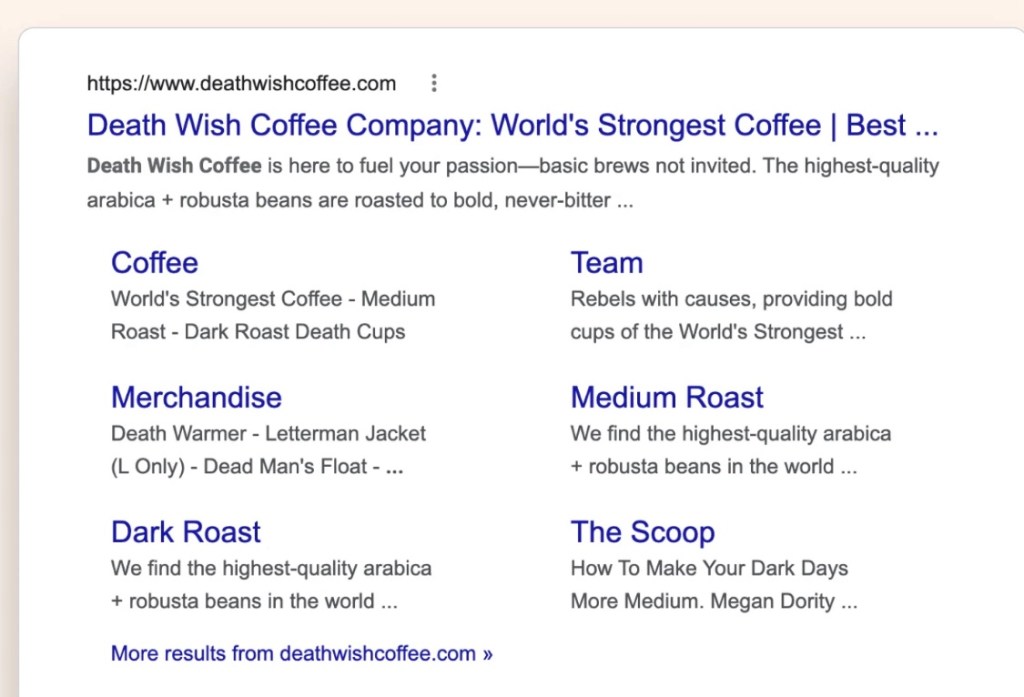
    A great example of meta description doing its job